Newsletter
Join the AIhubs Community
Get weekly updates on the latest AI tools, resources, and insights delivered straight to your inbox
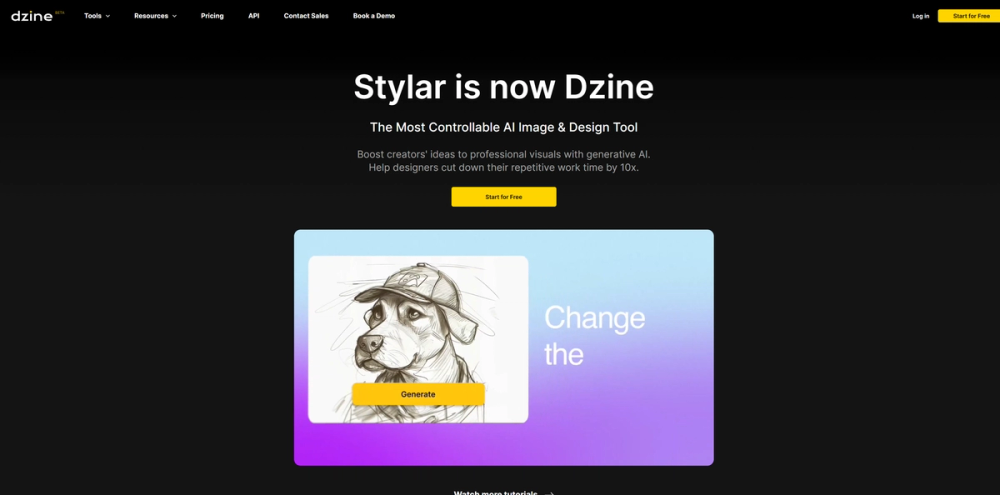
Dzine (formerly Stylar.ai) is an all-in-one online platform providing advanced AI image and design tools.
Dzine (formerly Stylar.ai) is an all-in-one online platform providing advanced AI image and design tools. It aims to transform the design process by offering controllable AI-powered features for image generation and editing. The platform is designed to boost creators' ideas into professional visuals using generative AI and help designers reduce repetitive work. Dzine offers a range of features from generating and editing images to enhancing them using various AI-powered tools.
Dzine is a comprehensive platform where users can generate and edit images in one place using AI-powered design workflows.
The AI Photo Filter allows users to transform portraits or photos into cartoons while retaining the original details and character in the generative art.
Users can merge different image elements into one cohesive image with a matching style using the AI Image Combiner.
This feature allows users to add and modify objects in their images by simply typing what they want, saving time compared to manual editing.
The tool efficiently removes objects, watermarks, or people from images by simply marking them.
Dzine's AI Background Remover simplifies cutting out photos, even for tricky parts like hair, allowing users to remove and change backgrounds for free.
Dzine is used by Creators and Designers who appreciate its combination of image generation and editing capabilities. It helps simplify workflows, save time, and ensure products stand out in the market.
Yes, Dzine is user-friendly, requiring no coding skills or high-end GPUs. Users can choose between text-to-image or image-to-image, and the platform provides a built-in GPT to craft prompts if needed. The canvas system allows for direct tweaking of details.
Start by selecting 'image-to-image' or 'text-to-image', choose a style, and input your prompt. Adjust 'structure match' and 'style intensity' for precise control. Use features like 'Generative Fill' to enhance designs.
Dzine offers 100 free credits upon registration and 30 free daily credits. A premium subscription is available for users with high-volume image creation needs, providing extra credits and faster processing times.
Dzine stands out as a user-friendly and controllable AI image editor with a versatile range of styles, built-in GPT for prompts, and groundbreaking image-to-image and generative fill functions. Its layer system allows users to focus on creativity rather than software complexities.
Dzine simplifies background removal with a single click and allows users to change backgrounds by placing a new background layer beneath the main subject.
Join the Dzine community on platforms like Discord, Instagram, Reddit, and YouTube to share work, get tips, and participate in creative contests.